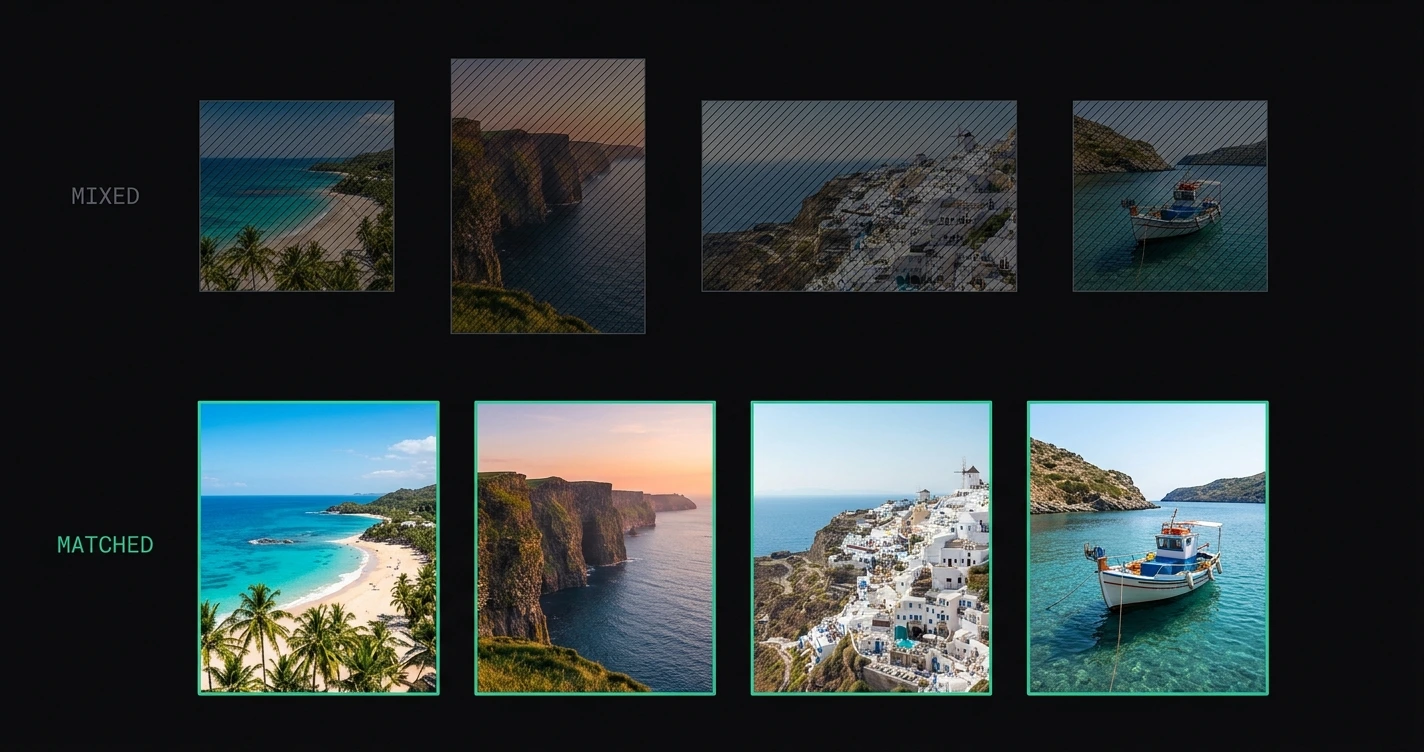
Carousels work differently from single posts in one important way: all slides must share the same aspect ratio. If they don't, Instagram applies separate cropping rules to each slide — and the result is an inconsistent carousel where some slides display full-bleed and others show with black bars.
Getting the dimensions right before uploading prevents this entirely.
For a full reference of all Instagram image formats, see the complete list of Instagram image dimensions.
TL;DR: Instagram carousels support 2–20 slides. All slides should share the same aspect ratio: 4:5 (1080 × 1350) for portrait, 1:1 (1080 × 1080) for square. Mixed ratios display inconsistently. Prepare all slides at a single target format using AspectFit before uploading.
On this page:
- Instagram carousel dimensions at a glance
- Aspect ratio rules for carousels
- What happens with mixed aspect ratios
- Best aspect ratio for carousels
- How to prepare carousel slides consistently
- Cover slide optimization
- Carousel tips for photographers
- Frequently asked questions
Instagram carousel dimensions at a glance
| Property | Value |
|---|---|
| Minimum slides | 2 |
| Maximum slides | 20 |
| Recommended format | 4:5 portrait (1080 × 1350 px) or 1:1 square (1080 × 1080 px) |
| Landscape option | 1.91:1 (1080 × 566 px) |
| Maximum file size per slide | 8 MB |
| Supported formats | JPEG, PNG |
| All slides must share the same ratio | Yes (effectively) |
Aspect ratio rules for carousels
Instagram applies one aspect ratio to the entire carousel based on the first slide. All subsequent slides are displayed at the same ratio as the first.
Practical result:
- If slide 1 is 4:5 and slide 2 is 1:1, slide 2 is displayed in a 4:5 frame — cropped to 4:5
- If slide 1 is 1:1 and slide 3 is 4:5, slide 3 is displayed in a 1:1 frame — the top and bottom of the 4:5 slide are cropped
- If slide 1 is 4:5 and slide 5 is 16:9, slide 5 is displayed in a 4:5 frame — heavily cropped
Instagram does not warn you about this mismatch during upload. You find out when the post goes live and some slides look wrong.
What happens with mixed aspect ratios
A common real-world scenario: a travel series where some shots are landscape (3:2) and some are portrait (4:5). Posted as a carousel without preparation, the result depends on which format the first slide is:
First slide is 4:5 portrait:
- Portrait slides display correctly
- Landscape slides are center-cropped to 4:5 — sides removed
- The viewer never sees the full width of the landscape shots
First slide is 1:1 square:
- Square slides display correctly
- Portrait slides are cropped — top and bottom removed
- Landscape slides are cropped — sides removed
The only way to post a consistent carousel with mixed-ratio source photos is to convert all slides to the same target ratio before uploading. Smart padding is the approach that does this without removing any composition from any slide.
Best aspect ratio for carousels
| Format | Ratio | Best for |
|---|---|---|
| Portrait | 4:5 | Maximum feed height, photo series, story-style carousels |
| Square | 1:1 | Grid-optimized brands, flat lays, product series |
| Landscape | 1.91:1 | Wide-shot series, architecture, panoramic continuations |
For most carousels, 4:5 is the recommended choice — the same reasoning as for single posts. More vertical screen space per slide means each slide gets more attention before the user swipes.
See best aspect ratio for Instagram posts in 2026 for the full feed visibility breakdown.
Exception: square carousels for grid aesthetics If your brand or profile uses a strict 1:1 grid, carousels at 1:1 are more consistent with the visual identity. The profile grid preview shows the first carousel slide as a square, which matches adjacent posts.
How to prepare carousel slides consistently
The most reliable workflow: process all slides through the same format conversion before uploading.
Using AspectFit:
- Open AspectFit
- Drop all carousel slides at once — regardless of their source aspect ratio
- Select a single target format: 4:5 or 1:1
- Choose a consistent background fill:
- White — clean, gallery-style
- Black — cinematic, dark-toned series
- Blurred background — colorful photo series
- Custom color — brand palette
- Download ZIP — all slides at the same ratio, ready for upload
Upload the slides in order. Since all slides are already at the correct ratio, Instagram applies no automatic cropping to any of them.
Keeping watermarks consistent too: if you brand carousel slides, save your watermark as a preset first (Watermark panel → Save as preset). Applying the same preset to every slide in the batch guarantees identical position, size, and opacity — the same consistency principle as the background fill, one click instead of re-entering the settings per batch.
Why consistent background fill matters: If slide 2 uses blurred background and slide 5 uses white, the carousel looks inconsistent. Decide the border style once and apply it uniformly. See how to add borders to Instagram photos for more detail on choosing a fill style.
Cover slide optimization
The cover slide is the first slide — it appears in the feed, on the profile grid, and in Explore. It has disproportionate importance for click-through rate on the carousel.
Cover slide best practices:
- Strong composition: The cover should work as a standalone image — clear subject, strong visual hook
- Leave space for the "1/N" indicator: Instagram overlays a slide counter in the top-right corner of carousel posts in the feed. Avoid placing critical elements in the top-right corner of the cover slide
- Consistent ratio: The cover slide sets the ratio for the entire carousel — make sure it's your preferred format before positioning it first
- Text slides as covers: If your carousel is a "how-to" or information series with a text cover, ensure the text is within the safe zone and the background color reads clearly in the grid thumbnail
Carousel tips for photographers
Panorama continuation across slides A panorama can be split across 2 or 3 carousel slides, each at 4:5 or 1:1, creating a left-to-right reveal as the viewer swipes. For this to work, the split points must be clean — no important elements split across the seam between slides. AspectFit's Split Canvas does this in one pass: fit the panorama to a canvas 2× or 3× the slide width, drag to position the seams, and export the set as a ready-to-upload ZIP. See how to post a panorama as an Instagram carousel and how to split a photo into an Instagram carousel for the full method, or how to post panorama photos on Instagram without cropping for the padding alternative.
Same-day photo series Batch-preparing a day's shoot for a carousel: drop all selected shots into AspectFit, apply 4:5 with consistent background, download ZIP, upload. The uniformity of the border style creates visual coherence across the carousel even when the individual compositions vary. A logo or credit can go on the whole set in the same pass — see how to add a watermark to multiple photos at once.
Before/after carousels Before/after comparisons work as 2-slide carousels. Both slides should be the same ratio — process both through the same AspectFit settings before uploading.
Text + photo mixed carousels If some slides are text (designed as graphics at the correct ratio) and others are photos, the text slides need to be at the same aspect ratio as the photo slides. Design text slides at 1080 × 1350 (4:5) or 1080 × 1080 (1:1) to match.
Frequently asked questions
Can carousel slides have different sizes (pixel dimensions)? The aspect ratio must be consistent, but the pixel dimensions don't need to be identical — Instagram scales to a consistent display size. However, uploading all slides at 1080 px wide is recommended to ensure maximum display quality.
What's the maximum number of slides in an Instagram carousel? 20 slides as of 2026. Instagram announced intent to expand this limit but the 20-slide cap remains in effect currently.
Does carousel format affect reach or algorithm performance? Instagram has stated that carousels benefit from multiple engagement signals: initial view, swipe interactions, and re-views (someone swiping back through the carousel). These interactions may contribute to distribution. There is no confirmed specific algorithm multiplier for carousels over single posts.
Can I add video slides to a carousel? Yes. Instagram carousels support a mix of photos and videos. The aspect ratio consistency rule applies to video slides as well — all content in the carousel displays at the aspect ratio set by the first slide.
My carousel looks right on desktop but wrong on mobile — why? Instagram's desktop preview is less precise than the actual mobile post. The mobile app is the authoritative display. Always check the carousel on a phone before publishing if precision matters.
How do I fix a carousel I already posted with mixed aspect ratios? You can edit a carousel post and replace individual slides (up to one slide replacement allowed after posting in most regions). For significant changes, delete and repost. Prepare all slides correctly before the second upload.