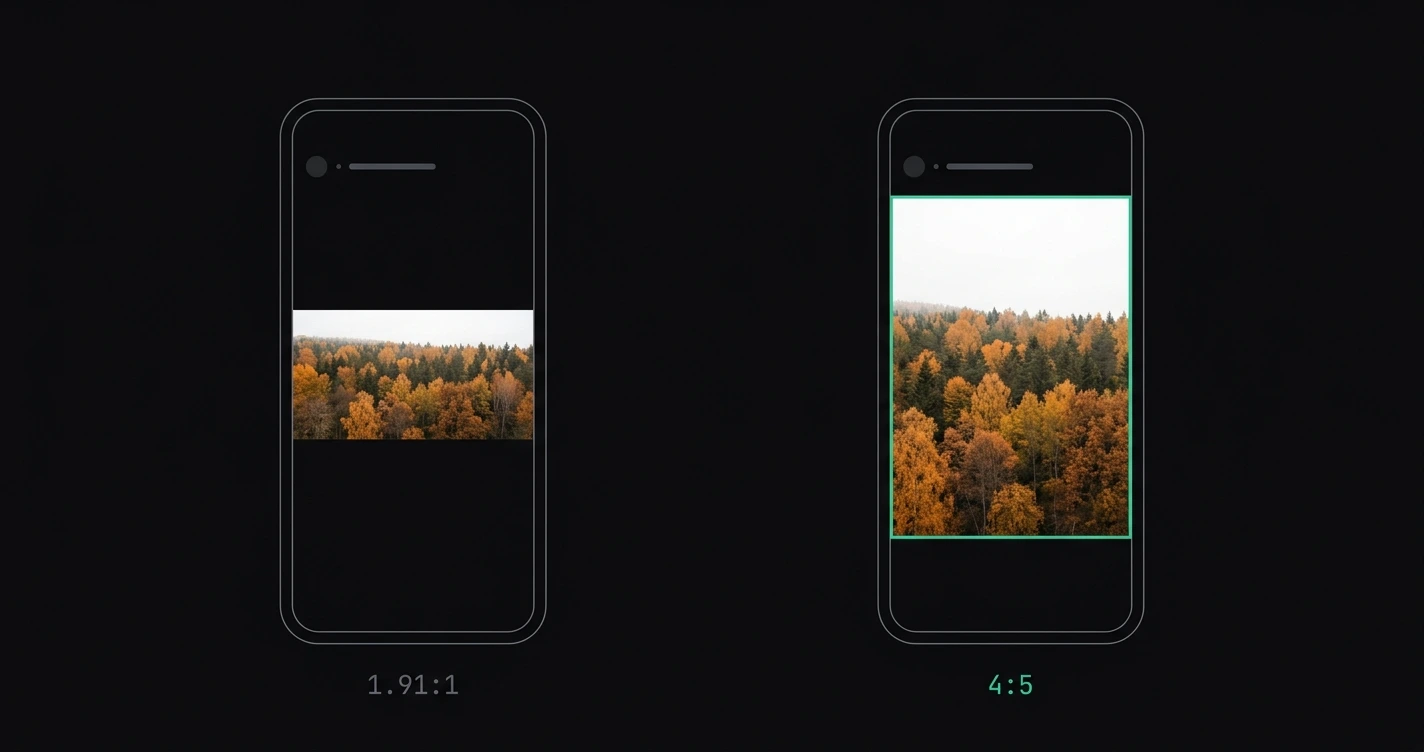
The best aspect ratio for Instagram feed posts in 2026 is 4:5 (portrait). It occupies more vertical screen space than any other supported format, which translates directly to more attention per post in the feed scroll.
For a full reference of every Instagram image dimension, see the Instagram image sizes 2026 guide.
TL;DR: Use 4:5 (1080 × 1350 px) for standard feed posts — it's the tallest format Instagram allows and gets more screen real estate than square or landscape. Use 1:1 if you're managing a grid aesthetic. Avoid landscape for feed posts unless the composition requires it. AspectFit converts any photo to 4:5 in-browser with no upload required.
On this page:
- Instagram's supported aspect ratios in 2026
- Why 4:5 is the best aspect ratio for feed posts
- When to use 1:1 square
- When to use landscape 1.91:1
- The 3:4 update: what changed in 2025
- How to post any photo at the right ratio without cropping
- Best aspect ratio by use case
- Frequently asked questions
Instagram's supported aspect ratios in 2026
Instagram's feed enforces a fixed range. Photos outside these limits get cropped or compressed automatically.
| Format | Aspect ratio | Dimensions (px) | Max file size |
|---|---|---|---|
| Portrait (recommended) | 4:5 | 1080 × 1350 | 8 MB |
| Square | 1:1 | 1080 × 1080 | 8 MB |
| Landscape | 1.91:1 | 1080 × 566 | 8 MB |
| Portrait close-to-max | 3:4 | 1080 × 1440 | 8 MB |
The 4:5 portrait format is the tallest photo Instagram allows in the main feed. Nothing between 4:5 and the 1.91:1 landscape limit gets auto-cropped — but content taller than 4:5 does.
Why 4:5 is the best aspect ratio for feed posts
Screen space = visibility
On a standard 6-inch phone display, a 4:5 post fills approximately 56% more vertical screen space than a 1.91:1 landscape post. More screen covered means the viewer pauses longer before scrolling past.
Comparative height by format on a typical 6-inch display:
| Format | Approximate display height | Relative coverage |
|---|---|---|
| 4:5 portrait | ~320 px | 100% (maximum) |
| 1:1 square | ~240 px | 75% |
| 1.91:1 landscape | ~140 px | 44% |
The feed grid view
Portrait posts at 4:5 still display as squares in the grid view on your profile. The format only affects how the image appears in the feed — not on the grid. So there is no grid aesthetic penalty for using 4:5 over 1:1.
Engagement correlation
Multiple independent studies by creators and social media researchers show that portrait-oriented posts consistently outperform landscape posts for reach and engagement on Instagram. The mechanism is simple: taller posts scroll slower.
When to use 1:1 square
Square (1:1) is still a strong choice in specific scenarios:
- Consistent grid aesthetics: Some brands and photographers maintain a strict square grid. If your visual identity depends on that uniformity, 1:1 is correct even if it sacrifices some feed height.
- Compositions that are naturally square: Studio product photos, flat lays, and certain portrait styles work better uncropped in square format.
- Carousels where consistency matters: Multi-slide carousels display more cleanly when all slides share the same ratio.
For most use cases where maximizing reach is the goal, 4:5 outperforms square.
When to use landscape 1.91:1
Landscape (1.91:1) is the correct choice when:
- The composition genuinely requires the wide field of view — panoramas, architecture, wide environmental shots
- The image is embedded in a Story or Reel as a supporting visual where portrait isn't appropriate
- You're posting a screenshot or wide-format graphic that loses meaning when padded to portrait
For standard photography where both formats are possible, landscape is rarely the better choice for feed posts. It takes up the least screen space and is the most easily scrolled past.
The 3:4 update: what changed in 2025
Instagram quietly added support for 3:4 (1080 × 1440) in 2025. This is relevant for photographers because the 3:4 ratio is common on newer smartphones (iPhone portrait mode, for example) and previously required padding or cropping to fit within the 4:5 limit.
Key difference: 3:4 is slightly taller than 4:5 in actual pixel count but narrower in ratio. In practice, 4:5 still displays larger in the feed because Instagram scales both to the same feed width, making 4:5 effectively taller on screen. The 3:4 addition means fewer automatic crops — but 4:5 is still the feed-optimized choice.
How to post any photo at the right ratio without cropping
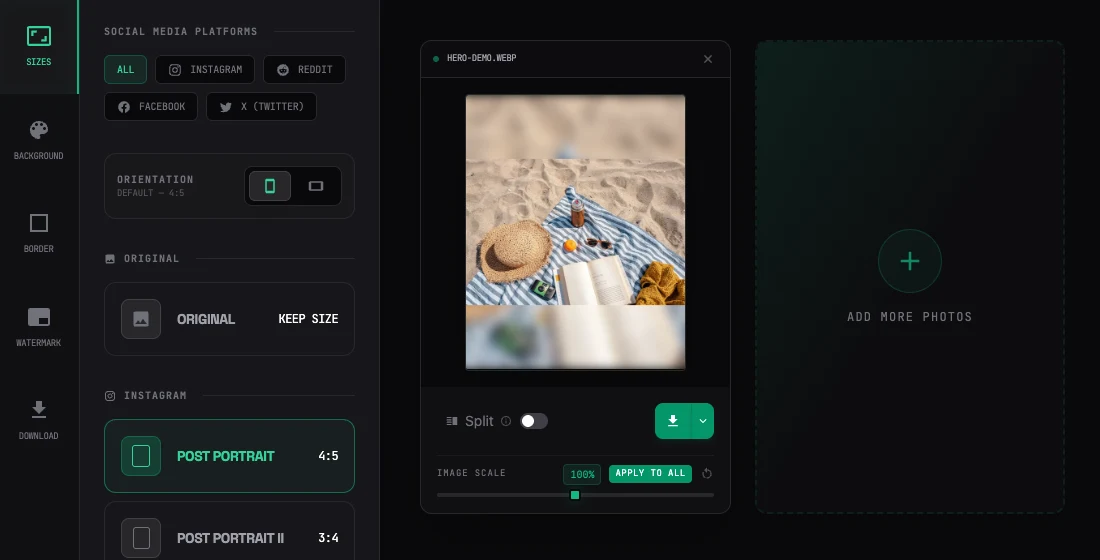
The challenge: most cameras shoot 3:2 or 4:3, not 4:5 or 1:1. Converting to Instagram's preferred format typically means either cropping (losing parts of the image) or adding padding.
Smart padding with AspectFit:
- Open AspectFit — all processing runs in your browser, zero uploads
- Drop in your photo (any ratio)
- Select 4:5 as the target format
- Choose a padding style: white borders, black borders, blurred background, or custom color
- Download the prepared image and post
The original photo stays 100% intact. The padding fills the difference between your source ratio and 4:5.
For batch processing — multiple photos at once — drop them all in and download a ZIP. AspectFit processes up to 4 images in parallel.
Best aspect ratio by use case
| Use case | Best ratio | Reason |
|---|---|---|
| Standard feed post (maximize reach) | 4:5 | Maximum vertical screen space |
| Consistent brand grid | 1:1 | Uniform grid appearance |
| Landscape / wide shots | 1.91:1 | Only option that preserves full width |
| Carousel (multiple slides) | 4:5 or 1:1 | Consistency across slides matters more than ratio optimization |
| Promoted / paid posts | 4:5 | More real estate improves performance |
| Reels cover thumbnail | 3:4 or 9:16 | Matches Reels display format |
Frequently asked questions
Does aspect ratio affect Instagram's algorithm? Instagram does not officially confirm aspect ratio as a ranking factor. However, taller posts occupy more feed space, which correlates with longer view time — a factor the algorithm does weight. The practical result is that 4:5 posts tend to perform better than landscape.
Is 4:5 the same as portrait mode on my phone? No. Portrait mode on iPhone typically produces 3:4 (portrait orientation). Instagram's 4:5 format is slightly different — it's wider relative to its height. You'll need to either crop or pad a 3:4 photo to get it to exactly 4:5.
Can I mix aspect ratios on my profile grid? Yes. Instagram supports all formats simultaneously on the same profile. Mixed ratios appear slightly inconsistent on the grid, but the feed experience for each individual post is unaffected.
Why does my 4:5 photo show as square in the grid? Instagram's grid view crops all posts to 1:1 for display. The full 4:5 image is only visible in the feed and when someone taps to view the post directly. This is expected behavior — not a sign the image was cropped.
What's the best aspect ratio for Instagram Reels? Reels use 9:16 (1080 × 1920). This is separate from feed posts and not covered by the 4:5 recommendation above. For Reels cover images, use 3:4 or 9:16. See Instagram Story dimensions 2026 for the 9:16 safe zones, which apply to both Stories and Reels.
What happens if I upload a photo taller than 4:5? Instagram crops it to 4:5 automatically. To prevent this, convert your image to 4:5 with smart padding before uploading — see How to post landscape photos on Instagram without cropping and Why Instagram crops your photos.