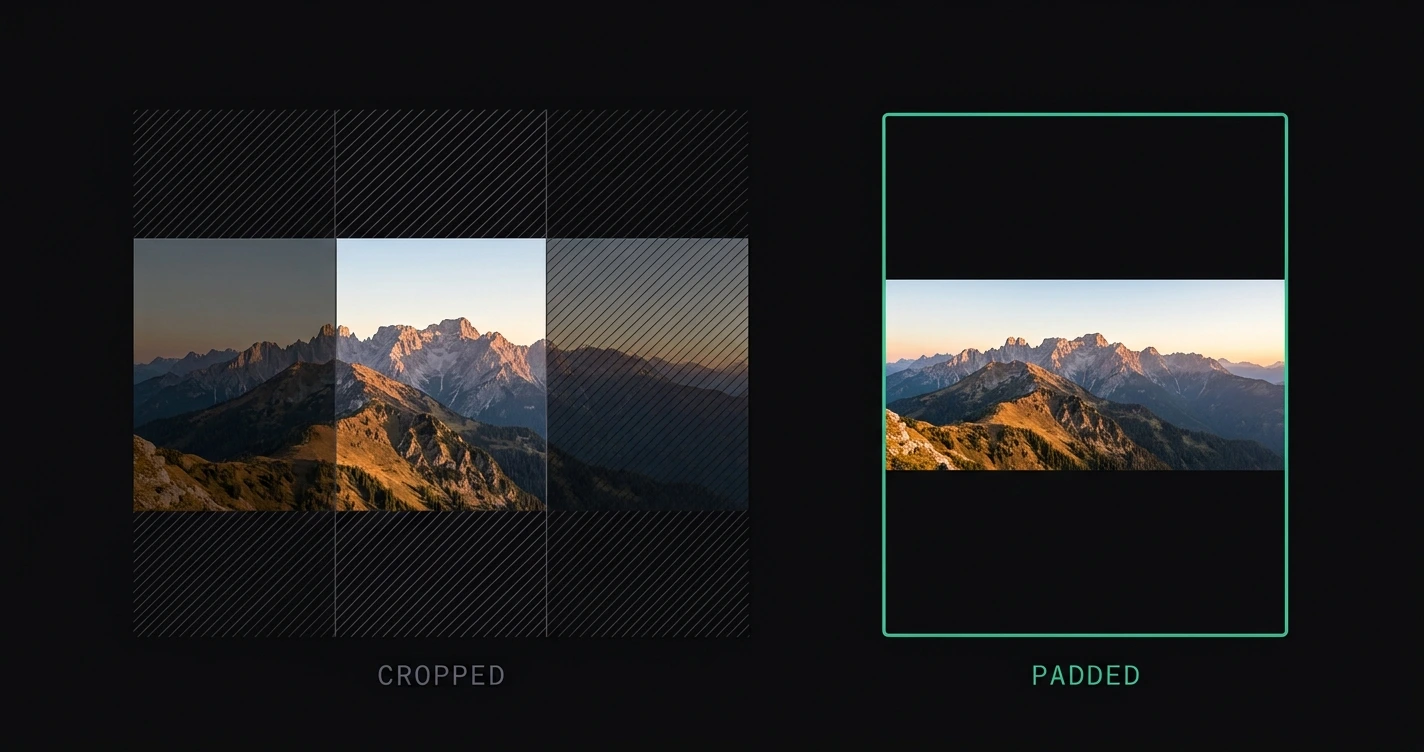
Panoramas are the format Instagram handles worst. A 3:1 or 4:1 ultra-wide shot exceeds Instagram's maximum landscape ratio of 1.91:1 — the platform either crops it to a narrow strip or compresses the image into an unusable shape.
The fix is to prepare the image before posting rather than letting Instagram decide what to cut.
For all Instagram format dimensions, see the Instagram image sizes 2026 guide.
TL;DR: Add smart padding to convert your panorama to a 4:5, 1:1, or 1.91:1 Instagram format — the full wide shot stays visible, surrounded by a background fill. AspectFit does this in-browser: no upload, no crop. Alternatively, split the panorama across a carousel.
On this page:
- Why panoramas get cropped on Instagram
- Which panoramas are most affected
- Method 1: Smart padding
- Method 2: Carousel split
- Method 3: Post in landscape and accept the limits
- Choosing the right background fill
- Frequently asked questions
Why panoramas get cropped on Instagram
Instagram's feed enforces a maximum landscape ratio of 1.91:1. Any photo wider than this gets automatically cropped to fit.
| Ratio | Example source | Width at 1080 px tall | Fits Instagram limit? |
|---|---|---|---|
| 1.91:1 | Instagram max | 2058 px | ✅ Yes — just fits |
| 3:2 | DSLR landscape | 1620 px | ✅ Yes |
| 16:9 | Wide monitor | 1920 px | ✅ Yes |
| 2:1 | Stitched panorama | 2160 px | ❌ No — cropped |
| 2.35:1 | Cinematic crop | 2538 px | ❌ No — heavily cropped |
| 3:1 | Ultra-wide lens | 3240 px | ❌ Severe crop |
| 4:1 | Long panorama stitch | 4320 px | ❌ Nearly unusable |
The 2:1 and wider ratios are where the problem becomes severe. Instagram's automatic crop removes entire regions of the panorama — skies, edges of landscapes, subjects at the frame edges.
Which panoramas are most affected
- Phone panorama mode — most produce 3:1 to 4:1 ratios. Heavily affected.
- Stitched panoramas from multiple shots — ratio depends on the stitch, commonly 2:1 to 3:1.
- Ultra-wide camera lenses — 0.6x lens on iPhone produces ~2:1 in some shooting modes.
- Fujifilm and Sony APS-C panorama modes — typically 2:1 to 3:1.
- Drone nadir-to-zenith stitches — extremely wide, often 4:1+.
- 360° panoramas — 2:1 is standard for equirectangular format.
Standard 3:2 DSLR landscape shots and 16:9 photos fit within Instagram's 1.91:1 limit. They display small in the feed but are not cropped. See how to post landscape photos on Instagram without cropping for the landscape-specific guide.
Method 1: Smart padding (recommended)
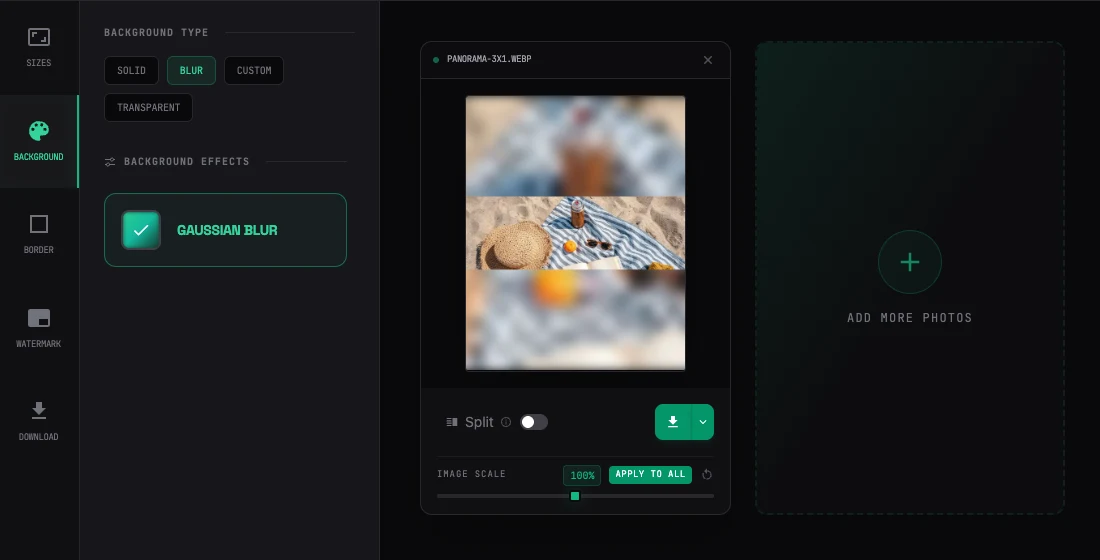
Smart padding centers your panorama on a taller canvas that matches an Instagram-supported ratio. The full width of the panorama stays visible. The space above and below (or around, depending on target format) is filled with a background.
Steps with AspectFit:
- Open AspectFit — no upload required
- Drop in your panorama
- Select a target format:
- 4:5 — portrait frame, tall with the panorama as a centered strip
- 1:1 — square, symmetric padding above and below
- 1.91:1 — landscape max, smaller padding, wider-looking result
- Select background fill: blurred background, white, black, or custom color
- Download
Which format to choose: For panoramas, the choice changes how much of the frame the panorama itself fills.
| Target | Panorama fill | Visual result |
|---|---|---|
| 4:5 | 35–50% of height | Large padding areas, panorama as a strip |
| 1:1 | 50–70% of height | Balanced, less padding visible |
| 1.91:1 | 70–100% of height | Closest to original ratio, minimal padding |
1.91:1 is closest to preserving the wide aspect ratio of the original. 4:5 produces the most vertical feed space (better for reach) but the panorama appears smaller relative to the frame.
Blurred background vs solid color
For panoramas specifically, blurred background is strongly recommended over solid white or black. The blurred panorama fill:
- Maintains the color palette of the original
- Prevents the visual disconnect of a white/black border against a colorful landscape
- Creates an immersive full-bleed look while keeping the full-width composition intact
Method 2: Carousel split
For very wide panoramas (3:1+), splitting the image across carousel slides preserves more detail per slide than padding it into one post — each slide gets its own full frame instead of sharing a single square with the rest of the panorama.
The distinction that matters is how the split is made. A generic tile splitter crops the panorama to the target ratio first, then slices it — anything that doesn't already match the combined canvas loses its edges. A fit-and-split approach scales the panorama to fit the combined canvas instead, so nothing is trimmed; the leftover space becomes background.
Steps with AspectFit's Split Canvas:
- Open AspectFit and drop in the panorama
- In the Aspect tab, pick the slide format — Post Square (1:1) for anything 1.9:1 or wider, Post Portrait (4:5) for panoramas closer to 1.6:1
- Turn on the Split toggle on the image card and choose 2 or 3 panels
- Open Edit Split Layout to drag the panorama and set where each seam falls — aim it at open sky, water, or another quiet stretch, not a subject
- Set a blurred background so any padding continues the panorama's color palette across the seam
- Download — one file per slide, bundled as a ZIP, named in carousel order
Result: The viewer swipes through the full panorama. When Instagram displays carousel posts in the feed, it shows the first slide — users who swipe see the rest.
Limitation: Carousel posts don't display the full panorama at once. The immersive wide-field effect is lost — viewers experience it as a sequence of standard-format images.
For the full mechanics — slide dimensions, which ratio to use, and how much frame each format recovers — see how to post a panorama as an Instagram carousel and how to split a photo into an Instagram carousel. Instagram's general carousel rules are in the Instagram carousel image sizes guide.
Method 3: Post in landscape and accept the limits
For panoramas that fit within 1.91:1 (or close to it), posting in landscape format is still a valid option. The image won't be cropped — but it will appear significantly smaller in the feed compared to a portrait post.
Feed visibility comparison:
- 4:5 portrait post: maximum feed height
- 1:1 square: 75% of portrait height
- 1.91:1 landscape: ~44% of portrait height
For photographers where the wide composition is the point — and cropping or padding would compromise it — posting in landscape and accepting the reduced feed real estate is the honest choice.
See best aspect ratio for Instagram posts in 2026 for a full breakdown of the reach tradeoffs between portrait, square, and landscape.
Choosing the right background fill
The background fill affects how the padded panorama reads in the feed:
| Background | When to use |
|---|---|
| Blurred background | Best for panoramas — maintains color palette, creates immersive feel |
| Black | Cinematic landscapes, night photography, dark-toned images |
| White | Minimalist or editorial content, bright travel photography |
| Custom color | Branded content, brand palette matching |
For most outdoor panoramas — landscapes, mountains, coastlines, aerial shots — blurred background is the right choice. It creates the effect of looking at the panorama through a wider window without the jarring solid-border discontinuity.
Frequently asked questions
Can I post a 360° panorama on Instagram? A full 360° equirectangular panorama (2:1 ratio) exceeds Instagram's 1.91:1 limit. You can pad it to 1:1 or 4:5 with AspectFit, or crop a 1.91:1 section for a standard landscape post. Instagram does not have native support for interactive 360° photo viewing (unlike Facebook).
Will Instagram crop my panorama if I just post it normally? If your panorama exceeds 1.91:1, Instagram crops it to fit. The crop removes the edges of the wide shot. There is no warning — Instagram crops silently. For anything wider than 16:9, always prepare the image before posting.
What's the best way to post phone panoramas to Instagram? Phone panorama mode typically produces 3:1 to 4:1 ratios. Smart padding to 1:1 with blurred background is the most versatile approach — the full panorama is visible, centered, and the blurred fill keeps the color palette intact. See how to add borders to Instagram photos for the full padding technique.
Does carousel or padding get more engagement? No reliable universal data exists. Carousels have the interaction advantage (swipe = engagement signal), which may benefit distribution. Padded single posts are simpler to create and display the full panorama immediately without requiring user action. Test both approaches on your own audience.
Can I post a panorama to Instagram Stories without cropping? Stories use 9:16 (portrait). A panorama posted to Stories gets letterboxed — a thin strip in the center with black bars above and below. For a better result, pad to 9:16 with a blurred background using AspectFit. See Instagram Story dimensions 2026 for full safe zone details.